The Documentation Review Process: A 7-Step Guide
A documentation review is a structured process where a document passes through one or more stages of evaluation before it reaches the reader. Each stage checks a different dimension of quality: technical accuracy, clarity, completeness, consistency, and usability.
It's different from proofreading. That’s because proofreading catches typos and grammar mistakes.
A documentation review catches wrong instructions, missing steps, broken logic, inconsistent terminology, and content that no longer matches how the product works.
If people make decisions or take actions based on your docs, those docs need to be reviewed before they go live. That applies to help articles, product guides, API references, SOPs, internal knowledge bases, and any other user-facing documentation.
This guide walks you through seven steps to set up and run a documentation review process. One that catches errors, keeps content accurate, and doesn't bottleneck your publishing timeline.
Let’s get started!
Documentation Review Process Step #1: Define Your Review Goals and Criteria
Every documentation review needs a clear purpose. Without defined goals, reviewers either try to check everything at once (slow and exhausting) or check nothing specific (surface-level and misses real problems).
Start by listing what your review should evaluate. There are five standard dimensions.
Technical accuracy
Does the document match how the product, feature, or process actually works right now? Are the steps correct? Do the screenshots reflect the current UI?
If a user follows the instructions exactly, will they get the described result?
Completeness
Does the document cover everything the reader needs to finish the task?
Are there missing steps?
Unexplained prerequisites?
Assumptions the reader won't share?
A common completeness failure: the article assumes the reader already has admin access, but never mentions that requirement.
Clarity
Can the target audience understand the content without re-reading?
Are instructions specific enough to follow without guesswork?
A step that says "configure your settings" is unclear.
A step that says "go to Settings > Integrations > Slack and toggle the switch to On" is clear.
Consistency
Does the document follow your style guide?
Are terminology, formatting, capitalization, and tone consistent with the rest of your documentation?
If your knowledge base calls it "Workspace" in 40 articles and this one calls it "Organization," that inconsistency confuses readers and breaks search.
Usability
Is the document structured for how people actually read? Most readers scan.
They jump to sections. They look for specific answers.
Do the headings describe what each section covers? Is the hierarchy logical? Can someone find the answer in 30 seconds, or do they have to read the whole page?
Write these criteria down
Turn them into a checklist that every reviewer receives. Without a checklist, reviews become subjective.
One reviewer fixates on grammar. Another ignores it entirely. The checklist keeps everyone aligned on what matters.
Adjust your criteria by document type
A troubleshooting guide should prioritize accuracy and completeness. An onboarding article should prioritize clarity and usability. An API reference should prioritize accuracy and consistency. One checklist doesn't fit every document.
Documentation Review Process Step # 2: Assign the Right Reviewers for Each Stage
Different review stages require different people. A developer can verify that an API call returns the right response, but shouldn't be your last line of defense on grammar.
An editor can polish the language, but can't confirm whether the steps in a setup guide actually work.
Match each review stage to the person with the right expertise for that stage.
Self-review (Writer)
This is the first pass. The writer re-reads their own draft to catch obvious errors: typos, broken formatting, incomplete sentences, and logical gaps. This happens before anyone else sees the document.
Tools like Grammarly or Hemingway can automate the surface-level grammar and readability checks. But the self-review also means testing every step against the live product. Click through the workflow.
Confirm the screenshots match what's on screen. Make sure the result described in the article is the result you actually get.
Peer review (Fellow writer or content team member)
A colleague on the writing team reviews for structure, flow, readability, style guide compliance, and usability. They read as a fresh set of eyes. They don't need deep product expertise.
Peer reviewers catch what the original writer is too close to see: unclear phrasing, assumed context, missing transitions, and headings that don't match the content below them.
They read the document the way an end user would, not the way the person who wrote it does.
Technical / SME review (Subject Matter Expert)
This is the accuracy check. A developer, engineer, product manager, or support lead confirms that the content is technically correct.
They verify that steps produce the expected result, that feature descriptions match the current build, and that edge cases are covered.
The SME review is often the hardest stage to complete. SMEs have other priorities. Reviewing documentation is rarely at the top of their task list.
Plan for delays and build buffer time into your schedule. We'll cover specific tactics for managing this in Step 5.
Editorial review (Editor or senior writer)
The final language and style pass. The editor checks grammar, tone, formatting, style guide adherence, and overall polish.
They make sure the document reads well as a finished product, not as a draft that got approved.
Not every document needs all four stages
A small FAQ update might need a self-review and a quick peer check. A new product launch guide might need all four stages plus a stakeholder sign-off. Match the review depth to the document's risk and visibility.
And always assign specific people, not "the team." Saying "engineering will review this" means nobody reviews it. Name one person per stage. That person owns the review.
Documentation Review Process Step # 3: Build Your Review Workflow
A review workflow defines who reviews what, in what order, and what happens after each stage. Without one, feedback comes in at random times from random people. Nobody knows when a document is ready to publish.
Here's how to build a workflow that keeps things moving.
Decide on the review sequence
The most effective order is: self-review, then peer review, then SME/technical review, then editorial review, then final approval, then publish.
This sequence works because each stage catches a different category of issues. There's no point in polishing grammar (editorial review) before confirming that the instructions are correct (SME review).
If the SME changes a procedure, the editor would have to review the same section twice.
Set deadlines for each stage
Reviews stall when there's no deadline. Give each reviewer a clear window. Two business days for a peer review. Three business days for an SME review. Shorter windows for urgent updates.
Communicate these timelines upfront. If a reviewer knows they have three days, they can plan. If they get a vague "when you get a chance," the review sits in their inbox for a week.
Choose where the review happens
Consolidate all feedback in one place. If one reviewer comments in Google Docs, another sends edits over email, and a third gives verbal feedback in a meeting, you lose track of changes.
You waste time reconciling feedback from three sources instead of working from one.
Pick a single platform for all review feedback. Options include;
Google Docs in suggesting mode, your knowledge base platform's built-in workflow, Git-based pull requests for docs-as-code teams, or a dedicated review and approval tool.
Define what "done" means for each stage
A reviewer should mark their stage as complete with a clear signal: approved, approved with changes, or needs revision.
Avoid ambiguity. "Looks good" with no further detail wastes everyone's time. Does "looks good" mean "I read every line and it's accurate" or "I glanced at the intro and it seems fine"? Define what completion looks like so there's no guessing.
Define when re-reviews are needed
If the writer makes significant changes based on SME feedback, does the peer reviewer need to look at it again?
Set a threshold. Minor wording edits: no re-review needed. Restructuring a section or changing a procedure: re-review required. Without this rule, you either skip necessary re-reviews (and miss new errors) or re-review everything (and slow the process to a crawl).
Documentation Review Process Step # 4: Create Your Documentation Review Checklist
A review checklist turns subjective opinions into a repeatable, consistent process. It tells every reviewer exactly what to look for. Nothing gets missed. Reviews don't depend on one person's instincts or mood.
Build a separate checklist for each review stage. Each reviewer has a different job, so each checklist should focus on different things.
Self-review checklist (for the writer):
- Spell check and grammar check passed
- All steps tested against the current product or feature
- Screenshots match the current UI
- No placeholder text or TODO notes left in the document
- Headings accurately describe the content below them
- All links are correct and not broken
- The document follows the style guide for formatting, capitalization, and tone
Peer review checklist (for the content team):
- The document's purpose is clear within the first two paragraphs
- The structure is logical and sections follow the reader's workflow
- Headings and subheadings are descriptive enough to be useful on their own
- No assumed knowledge that the target audience wouldn't have
- Terminology is consistent with the rest of the knowledge base
- The document is scannable: short paragraphs, clear headings, bolded key terms
SME review checklist (for the technical reviewer):
- All technical claims and instructions are accurate
- Steps produce the described outcome when followed exactly
- Prerequisites are listed and correct
- Edge cases and limitations are documented where relevant
- Feature names, parameter values, and code examples are correct
- No outdated information referencing deprecated features or old UI
Editorial review checklist (for the editor):
- Grammar, punctuation, and spelling are correct
- Tone matches the brand voice and style guide
- Sentence and paragraph length support readability
- Formatting is consistent across heading levels, list styles, and callout boxes
- The document reads well as a whole, from the introduction to the closing
Keep each checklist focused. Eight to twelve items per stage is the sweet spot. A 50-item checklist becomes a box-ticking exercise. Reviewers stop reading carefully and just check everything off to finish faster.
Store your checklists in a shared location where every reviewer can access them. Attach the relevant checklist to each review request.
Don't make reviewers go hunt for it. The easier it is to follow, the more consistently it gets used.
Documentation Review Process Step # 5: Run the SME Review Without Bottlenecks
The SME review is where most documentation review processes stall.
Subject matter experts are developers, engineers, or product managers. Reviewing docs is not their primary job. It's an interruption to their main work. So reviews get deprioritized, delayed, or forgotten entirely.
This step gets its own section because managing the SME review well is the difference between a documentation review process that works and one that collapses after two months.
Make it easy for the SME
Don't send the entire document and ask them to "review it." That's a vague, open-ended task that takes 30 minutes or more. Most SMEs will put it off.
Instead, highlight the specific sections that need their input. If you need them to verify three steps in a 15-paragraph article, point them directly to those three steps. Link to the exact section. Call out what you need them to confirm.
Be specific about what to check. "Can you review this?" is too vague. "Can you confirm that these steps produce the expected result when using the Slack integration on a paid plan?" gives them a scoped task they can complete in 10 minutes.
Give them a deadline with buffer time built in. If your publish date is Friday, set the SME review deadline for Wednesday. Late reviews are the norm, not the exception.
If you set the deadline for Thursday, a one-day delay pushes your publish date. If you set it for Wednesday, that same delay still leaves you on schedule.
Reduce how often you need full SME reviews
Not every update requires a full technical review. Define tiers based on the scope of the change.
For small updates like fixing a typo or swapping a screenshot, skip the SME review. The writer can verify the change against the live product.
For medium updates like adding a new section or revising a procedure, ask the SME to review only the changed content. Send them a diff or highlight the new paragraphs. Don't make them re-read the entire article.
Reserve full-document SME reviews for new articles and major rewrites. These are the cases where accuracy risk is highest, and a thorough review is worth the time.
Handle conflicting SME feedback
When two SMEs give contradictory feedback, don't try to merge both answers into one document. That usually creates a Frankenstein article that's half-right from two perspectives.
Instead, set up a quick 10-minute call or Slack thread to align them. The writer should not be the tiebreaker on technical accuracy. Get the SMEs to agree on the correct answer, then implement the resolution.
Document the outcome so the same conflict doesn't reappear in the next review cycle. A short note like "confirmed with engineering: OAuth tokens expire after 24 hours, not 48" saves time later.
Documentation Review Process Step # 6: Manage Feedback and Revisions
Reviews generate feedback. Feedback needs a system. Without one, comments get lost across tools, contradictory edits pile up, and the writer spends more time managing the feedback than fixing the document.
Consolidate all feedback in one place
If one reviewer leaves comments in Google Docs, another sends edits over Slack, and a third drops feedback in a Jira ticket, the writer has to check all three sources. Then cross-reference them. Then hope nothing falls through the cracks.
Enforce a single feedback channel. This could be inline comments in your knowledge base tool, a shared Google Doc, a pull request, or a dedicated review platform. One source of truth for all feedback. No exceptions.
Categorize feedback by priority
Not all feedback is equally urgent. Treating every comment as a must-fix creates endless revision cycles. Ignoring feedback creates resentment and repeat issues.
Sort feedback into three tiers:
- Must-fix. Factual errors, wrong instructions, missing steps, broken links, compliance issues. These get addressed before publish. No exceptions.
- Should-fix. Unclear phrasing, structural issues, style guide inconsistencies. Fix these in the current review cycle if time allows. If a deadline forces a tradeoff, these take priority over cosmetic items.
- Nice-to-have. Minor wording preferences, alternative phrasing suggestions, cosmetic tweaks. Log these for the next revision. They don't block publishing.
This prioritization prevents reviews from spiraling into infinite rounds of "I'd phrase it differently." It also gives the writer clear guidance on where to focus.
Set a revision window
After collecting all feedback, the writer has a defined period to make revisions. For most articles, one to two business days is enough.
The revision window prevents reviews from dragging on. Without it, the writer might wait for "one more round of feedback" that never comes, or take a week to make changes that should take an afternoon.
Track what was addressed and what was deferred
If you skip a suggestion, note why. "Deferred: cosmetic preference, not a clarity issue" keeps a clean record. It also prevents the same feedback from reappearing next review cycle when a different reviewer raises the same point.
A simple tracking method works: a column in a spreadsheet, a resolved/deferred tag in your review tool, or a comment thread on the document itself. The format doesn't matter. The habit of logging decisions does.
Documentation Review Process Step # 7: Approve and Publish
This is the final gate before a document goes live. Approval confirms that every review stage is complete, all must-fix feedback has been addressed, and the document is ready for the audience.
Define who has publishing authority
Not everyone who reviews a document should be able to publish it. Typically, the documentation lead or a senior writer gives final approval. In regulated industries like healthcare or finance, a compliance officer may also need to sign off.
Keep the approval chain short. One or two people are enough for most teams. If five people need to approve before publishing, your process will grind to a halt on routine updates.
Run a final scan before publishing
This is not another full review. It's a quick five-minute pass to catch anything that slipped through during revisions.
Check for formatting broken during edits. Confirm that screenshots are uploaded correctly. Make sure links point to production URLs, not staging or internal ones. Verify that the table of contents (if applicable) reflects the final structure.
Think of it as a pre-flight check. You've already done the thorough inspection. This is the last glance before takeoff.
Publish and archive the review trail
Save a record of who reviewed the document, when they reviewed it, what feedback they gave, and what changes were made. This review trail serves three purposes.
First, it helps with audits. If your organization has compliance requirements, you can prove that every document went through a defined review process.
Second, it helps onboard new writers. They can study past review trails to understand what reviewers look for and how feedback gets handled.
Third, it resolves disputes. If someone questions why a document says what it says, the review trail shows the decisions and the people who made them.
Version the document
If your platform supports versioning, save the published version with a clear label (v1.0, v2.0). If a future edit introduces an error, you can roll back to the last approved version immediately, rather than trying to reverse-engineer what changed.
Set the next review date
Don't wait for a user to report an error before reviewing the document again. Set a review reminder based on the content type.
Quarterly works for stable content like company policies or process overviews. Monthly works for documentation tied to features that change frequently. After every product release, works for feature-specific articles where updates are tied to the development cycle.
The review date closes the loop. Your documentation review process isn't a one-time event. It's a cycle: write, review, publish, schedule the next review, repeat.
How InstantDocs Helps You Run a Smoother Documentation Review Process
You now have a complete documentation review process. But running it manually across dozens or hundreds of articles creates real overhead.
Tracking which articles need review takes time. Identifying what's outdated requires combing through support tickets by hand. And producing content fast enough to keep up with product changes is where most teams fall behind.
InstantDocs is an AI-powered knowledge base platform that handles the parts of the review process that are hardest to do manually.
Knowledge Gap: Find What Needs Review Before Users Find Errors
In Step 1, we covered checking for technical accuracy. In Step 6, we covered managing revisions. Both depend on knowing which articles are outdated in the first place.
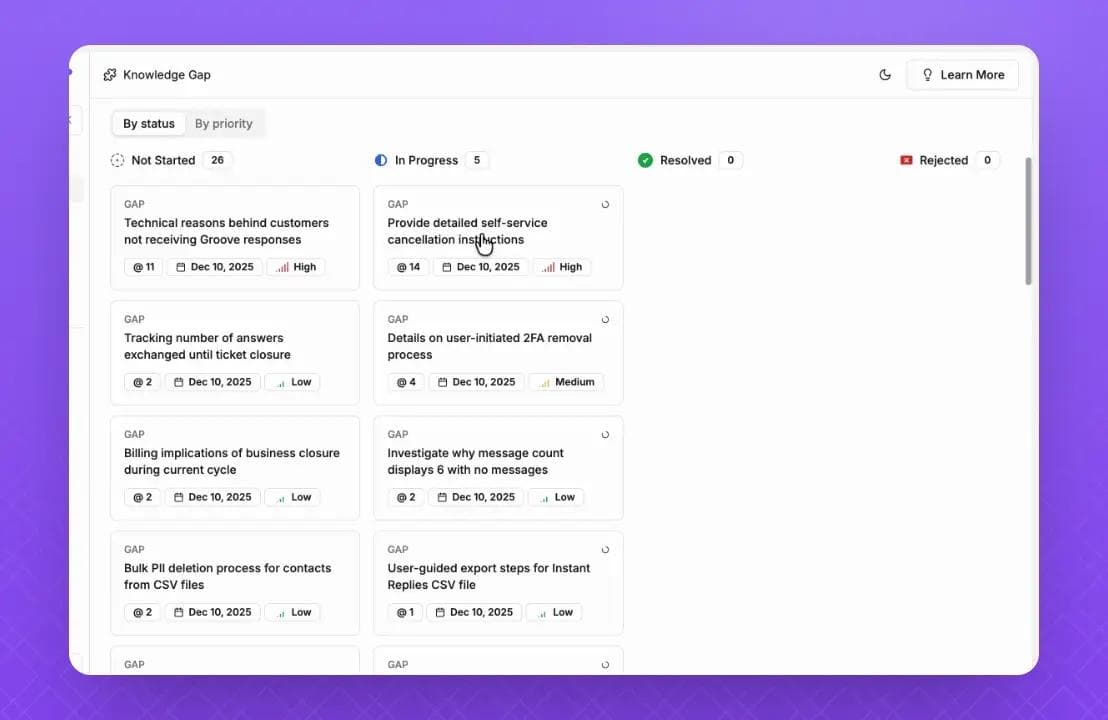
InstantDocs' Knowledge Gap feature automates that detection. It analyzes your incoming support tickets and cross-references them against your existing documentation. When tickets cluster around a topic where the article is outdated or missing, Knowledge Gap flags it.
You see which articles need review and which topics need new content. Each flag comes with the related support tickets as evidence, so you can see exactly what users are struggling with.
Instead of waiting for a scheduled quarterly review to catch stale content, you catch problems as soon as users encounter them.
AI Recorder: Start With More Accurate Drafts
In Step 5, we covered the SME review and how to reduce revision rounds. A common reason docs fail the SME review is that the writer didn't have direct access to the feature or misunderstood the workflow.
The result: multiple rounds of back-and-forth before the article matches the actual product.
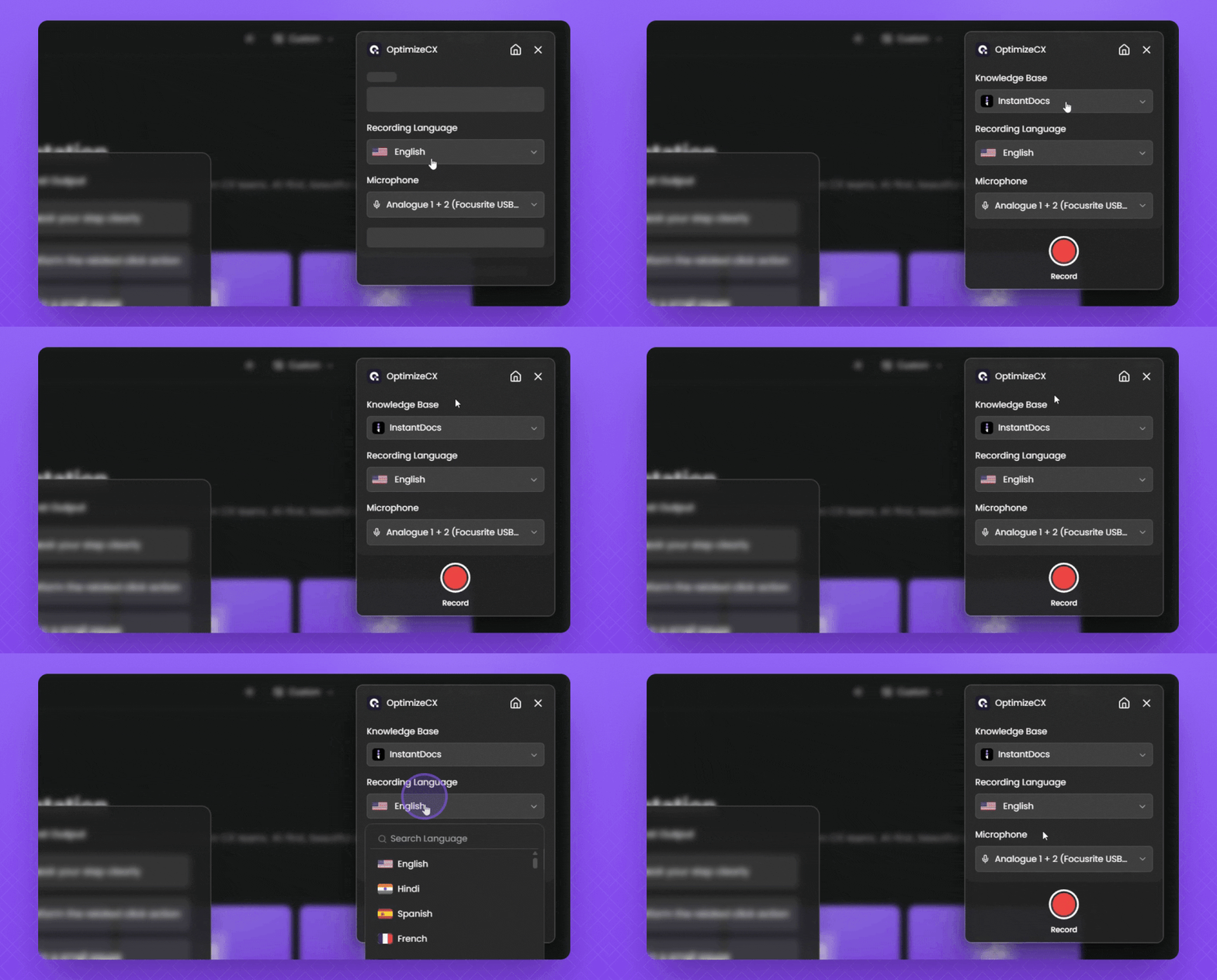
InstantDocs' AI Recorder removes that gap. It's a Chrome extension that lets you record a screen walkthrough of the actual process in your product. After recording, it automatically:
- Extracts key screenshots from the video
- Generates step-by-step written instructions from the recording
- Adds a studio-quality voiceover synced to the video
- Produces an editable video with customizable intro/outro templates
Because the content is generated from a real product walkthrough, it starts closer to technically accurate. The SME review becomes a quick verification instead of a rewrite. Fewer rounds of revision. Faster path from draft to published.
Built-In Editor and Knowledge Base
In Steps 3 and 7, we covered building a review workflow and publishing. InstantDocs gives you a Notion-like block editor for drafting, collections and sections for organizing content, and a branded knowledge base for publishing.
The content goes from draft to live in one platform. No exporting between tools. No copying from a Google Doc into a separate publishing system. One place for writing, reviewing, and publishing.
Import From Existing Tools
If you're inheriting a backlog of unreviewed docs from another platform, InstantDocs supports importing from Zendesk, Intercom, Confluence, Notion, Crisp, and Google Docs.
Bring your content in, run it through your new review process, and republish under a clean structure. You don't have to start your content library from scratch.
SaaS teams are already using this modern workflow to achieve real results:
- Conzent ApS cut their documentation creation time by 90%.
- Busable saved over 93 hours by plugging InstantDocs directly into their development workflow.
- C2Keep launched a clean, branded knowledge base in days, not months.
So, are you ready to transform your knowledge management process from reactive to proactive?


Instantly build support docs that delight.
Book a demo