Why PDFs Hurt Your Business (And What to Use Instead)
PDFs are everywhere. Chances are, your company uses them for help docs, onboarding guides, product manuals, or internal SOPs.
Many teams don't realize there's a better way to manage this content through a knowledge base. They feel like a safe, simple choice. Everyone can open them. They look the same on every device. What's not to like?
Quite a lot, actually.
While PDFs once made sense for sharing documents, they've quietly become a drag on your business. They cost you search traffic, frustrate your customers, and create busywork for your team.
Let's break down exactly how.
Why PDFs Hurt Your Business #1: They're Invisible to Search Engines
Every piece of content you publish is a chance to show up in Google. But PDFs make that nearly impossible.
Here's why. PDFs don't support structured data, meta descriptions, or internal links. Google can technically crawl them, but it ranks them far below regular web pages. A PDF sitting on your website won't get the same SEO treatment as an HTML page with proper headings, schema markup, and a clear URL structure.
So if you've packed your product documentation or help articles into PDFs, that content is basically invisible. It won't rank. It won't drive traffic. And it won't bring potential customers to your site through organic search.
That's a missed opportunity every single day.
Why PDFs Hurt Your Business #2: They Kill the User Experience
Think about the last time you clicked a link and a PDF started downloading. It pulled you out of what you were doing. You had to open a separate file, scroll through pages to find the one paragraph you needed, and then go back to what you were doing before.
Now imagine your customers going through that same experience when they're trying to find an answer in your help docs. It's frustrating. On mobile, it's even worse. PDFs don't adapt to smaller screens. The text is tiny, the layout doesn't reflow, and pinch-to-zoom only goes so far.
The result is predictable. People give up looking for answers and submit a support ticket instead. That's more load on your team and a worse experience for your customers. Over time, this kind of friction contributes to customer churn.
Why PDFs Hurt Your Business #3: They Create Version Control Chaos
PDFs are static files. Once you export and share one, it's frozen in time. If your product changes, your pricing updates, or your policies shift, every PDF you've already distributed is now wrong.
And there's no way to recall them. They live in email inboxes, Slack threads, shared drives, and desktop folders. You end up with multiple versions floating around, and nobody knows which one is current. Your team wastes time tracking down the latest file. Your customers might be reading outdated information without even realizing it.
With a web-based knowledge base, you update content once and it's current everywhere, instantly. No version confusion. No outdated files in the wild.
Why PDFs Hurt Your Business #4: You Can't Track How People Use Them
When someone visits a web page, you can track everything. What they searched for, how far they scrolled, which sections they spent time on, and where they dropped off. That data tells you what's working, what's confusing, and what's missing.
PDFs give you none of that. You might know how many times a PDF was downloaded, but that's it. You don't know if anyone actually read it. You don't know which sections were useful. You don't know what people searched for and couldn't find.
Without that data, you're guessing about what your customers need. And guessing leads to gaps in your documentation that drive more support tickets.
Why PDFs Hurt Your Business #5: They Fail Accessibility Standards
Most PDFs are not accessible. Screen readers struggle to interpret them. Text doesn't reflow for users who need larger fonts. Color contrast is baked into the design with no way to adjust it.
This isn't just a usability issue. It's a compliance risk. If your business operates in healthcare, finance, education, or government, you may be required to meet WCAG, ADA, or Section 508 accessibility standards. PDFs that fail these standards put your company at legal risk.
Web-based content, on the other hand, can be built to meet accessibility standards from the start. Text reflows naturally. Screen readers can navigate headings and sections. Users can adjust contrast and font sizes in their browsers.
Why PDFs Hurt Your Business #6: They Silo Knowledge Across Teams
PDFs don't support collaboration. One person creates a document, exports it as a PDF, and emails it to the team. From that point on, the knowledge inside that file is stuck.
There's no commenting, no shared editing, no easy way to reuse sections of content in other documents. If someone on another team needs that information, they have to track down the file, hope it's the right version, and copy-paste what they need.
Over time, this creates knowledge silos. Important information gets buried in individual inboxes and folders instead of living in a central, searchable location where everyone can access it.
Why PDFs Hurt Your Business #7: "Free" is Expensive
One reason companies stick with PDFs is that they seem free. You don't need special software. You just export, upload, and you're done.
But the real costs are hiding in plain sight. Every support ticket caused by a customer who couldn't find the answer in a PDF costs money. Every hour an employee spends hunting for the right version of a document costs money. Every page of documentation that doesn't rank in Google is traffic and revenue you're leaving on the table.
When you add all of that up, the "free" format turns out to be one of the most expensive choices you can make for your documentation.
What You Need is a Knowledge Base That Does the Work for You
At this point, the problem is clear. PDFs create friction for your customers, blind spots for your team, and hidden costs for your business.
The solution is moving your documentation to a living knowledge base software that stays updated, searchable, and trackable.
But here's where most teams get stuck. They know PDFs aren't working, but who has time to rewrite everything? That's exactly why we built InstantDocs.
InstantDocs is knowledge base software that doesn't just give you a place to organize your docs. It actually writes them for you. Here's how it works.
Our AI Recorder lets you capture knowledge by simply talking through a process or workflow.
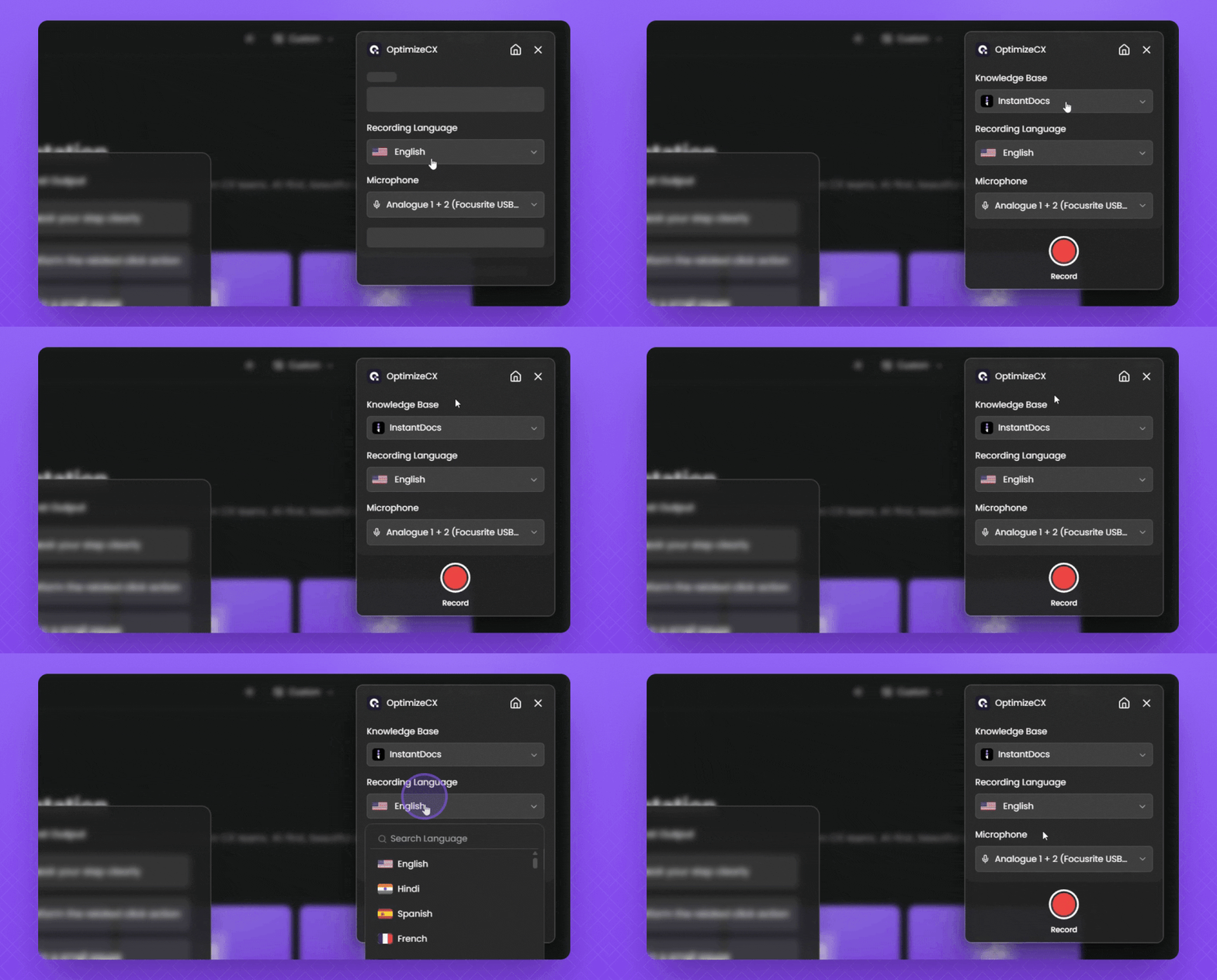
Instead of sitting down and writing help articles from scratch, you record what you know and InstantDocs turns it into a polished, structured document.
That means the expertise already in your team's heads can become published documentation in minutes, not weeks.
Then there's our Knowledge Gap Finder. Remember the analytics blindspot we talked about? InstantDocs solves that by analyzing your knowledge base and showing you exactly what's missing.
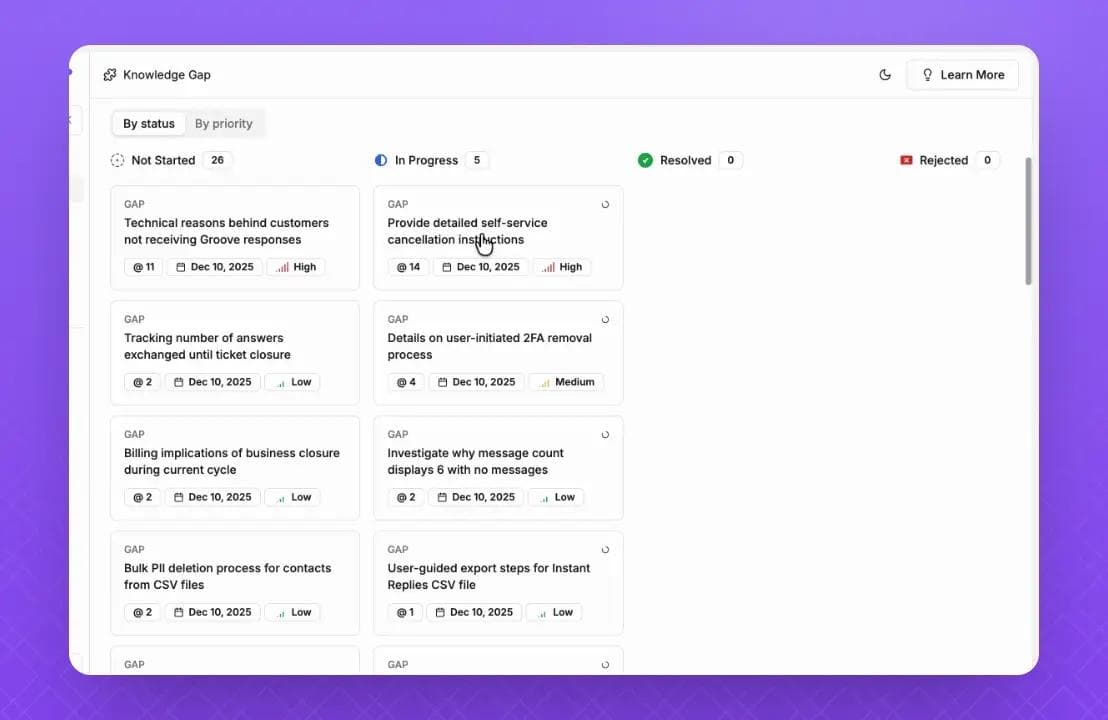
It identifies the questions your customers are asking that you haven't answered yet. Instead of guessing what content to create next, you get a clear list of gaps to fill.
Everything you publish through InstantDocs is web-based, which means it's automatically searchable, mobile-friendly, and accessible.
It also integrates with your existing tools, so your content lives where your team already works. When you update an article, the change goes live everywhere. No version confusion. No outdated PDFs floating around.
And we keep things simple on pricing too. InstantDocs starts at $79/month with locked pricing, so your costs don't spike as your knowledge base grows. Every new account also gets VIP onboarding to help you migrate from PDFs and get set up fast.
If your documentation is stuck in PDFs, it might be time to make the switch. Try InstantDocs free or book a demo and see how fast you can turn scattered documents into a knowledge base that works.


Instantly build support docs that delight.
Book a demo